AccountingLink for Sage 300 Construction and Real Estate configuration
Below are some general guidelines on how to set up AccountingLink for Sage 300 Construction and Real Estate.
Complete the steps in this section to set up the AccountingLink for Sage 300 Construction and Real Estate with Sage Construction Management.
-
The AccountingLink is compatible with the following browsers:
- Google Chrome (recommended)
- Microsoft Edge
- Mozilla Firefox
-
By using the AccountingLink for Sage 300 Construction and Real Estate, you acknowledge that you have read and agree to the
 Sage Construction Management End User License Agreement for Software.
 -
It's recommended to set the Estimate Rounding and Transaction Rounding in Settings > Company Settings > Global Settings to two (2) decimal places to prevent posting errors.
-
Implement only new projects in Sage Construction Management.
-
Set up an hh2 cloud service account.
- Log in to Sage Construction Management using the Sage Construction Management Admin user account.
- Select the gear icon (
 ) on the top right to open the Sage Construction Management settings.
 - Go to Company Settings > Profile.
- In the External Applications section, select Sage 300 Construction and Real Estate as the Accounting application.
- Select Save.
- Log out of Sage Construction Management and close the browser.
- Open the browser and log in to Sage Construction Management.
- On the left navigation menu, select AccountingLink.
-
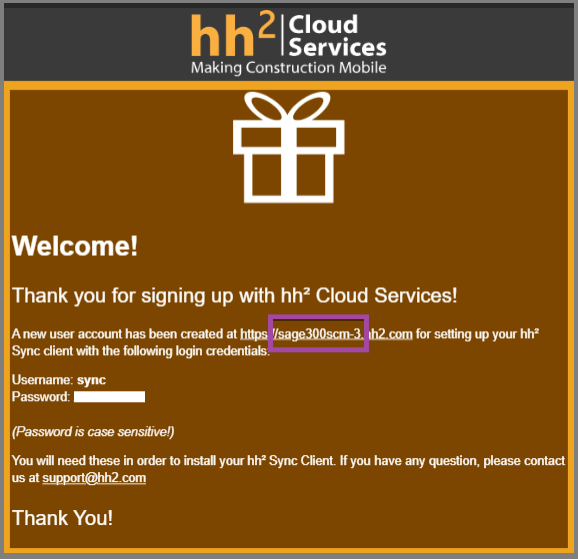
Connect to Sage 300 Construction and Real Estate using the hh2 Cloud Service account information sent to you by email after the hh2 installation:
- Site Identifier: The identifier included between https:// and .hh2.com. For example, in https://sage300scm-3.hh2.com, the site identifier is sage300scm-3.
- Username: Usually Sync.
- Password: The password included in the email, which is specific to your connection.
- Select Posting preferences and update all posting preferences before running the posting wizard.
- Select Save.
-
Purchase an hh2 cloud service account. You can place an order with hh2 to purchase the cloud service account directly from hh2 not through your Sage Partner.
Note: You or your Sage Partner cannot set up hh2 on your own. -
Schedule meeting and orientation. hh2 will set up the tenant and send you an email to schedule a meeting and work through the setup process.
-
Notify Sage Partner. Once your hh2 account is ready, notify your Sage Partner.
-
Coordinate a meeting with your Sage Partner and hh2. This meeting typically takes up to 1 hour.
-
Integrate with Sage Construction Management. After the meeting, your Sage Partner can proceed to integrate Sage Construction Management with the accounting application.