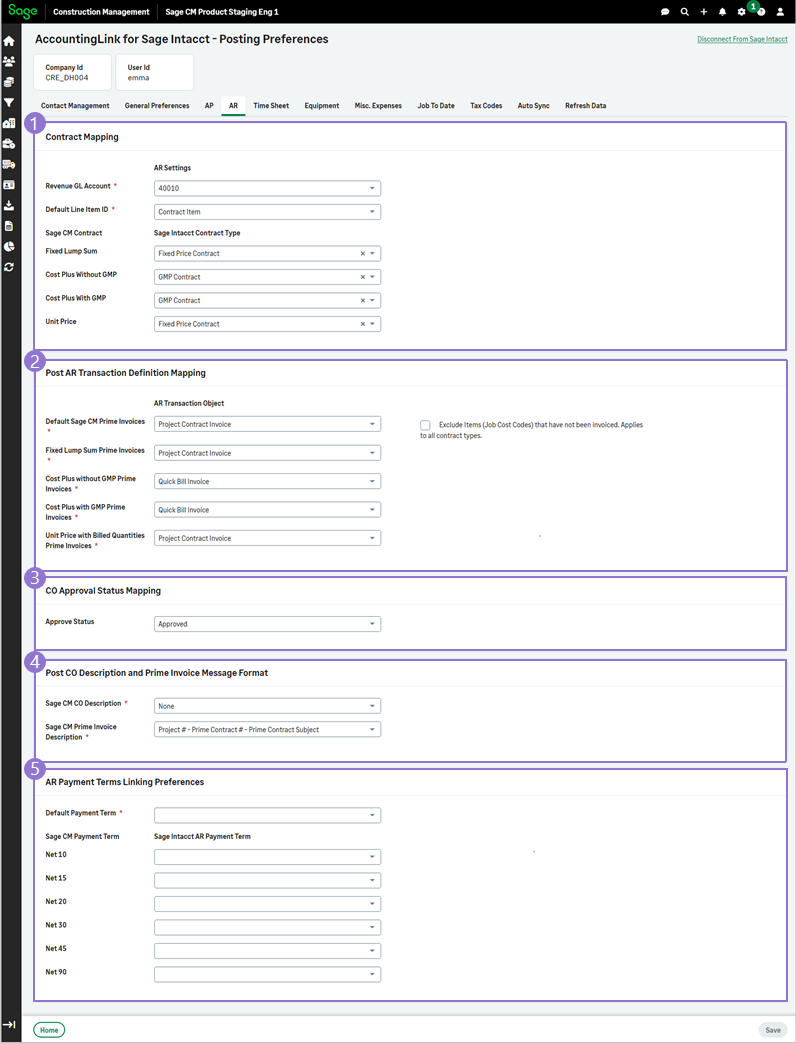
Post Preferences - Accounts Receivable (AR) Tab
-
Each Sage Construction Management transaction for Accounts Receivable (AR) can be mapped to a Sage Intacct transaction definition.
Use the corresponding Sage Intacct contract type fields to map Sage Construction Management contract types to the project contract types in Sage Intacct.
Sage Construction Management transaction / contract type Sage Intacct transaction definition / contract type Sage Intacct contract invoice object Revenue GL Account This is a required field. Select the corresponding GL account from the dropdown, e.g., Credit Card Payable, Debit Card Payable, etc. N/A Default Line Item ID This is a required field. Select the corresponding item id from the dropdown. N/A Fixed Lump Sum Select Fixed Price Contract.
Select the checkbox to enable using its doc # in Sage Intacct.
Select Project Contract Invoice. Cost Plus With GMP
Cost Plus Without GMP
AccountingLink for Sage Intacct looks whether a Project Contract is present:
-
If a Project Contract exists, the system uses the Cost Plus with GMP AR invoice.
Select the checkbox to enable using its doc # in Sage Intacct. -
If a Project Contract does not exist, AccountingLink for Sage Intacct is set to use the Cost Plus without GMP AR invoice.
Select the checkbox to enable using its doc # in Sage Intacct.
Select Project Contract Invoice. Unit Price Select Fixed Price Contract.
Select the checkbox to enable using its doc # in Sage Intacct.
Select Project Contract Invoice. The Contract Invoice Object must have auto numbering disabled in Sage Intacct to use the Sage Construction Management Transaction #.Use Quick Bill Invoice for Cost Plus Prime Invoices, regardless of whether the contract includes a GMP. Use Project Contract Invoice only when you need to reference contract line items for a Cost Plus With GMP contract.-
Exclude Items (Job Cost Codes) that have not been invoiced. Applies to all contract types.: Select the checkbox to exclude Job Cost Codes that have not been invoiced.
-
-
-
Revenue GL Account Mapping Logic:
> Use Default GL Account Only
> Use Sage CM Project Classification to populate Revenue GL Account
> Use Sage CM Contract Type to populate Revenue GL Account
-
Default Revenue GL Account
-
Sage CM Project Classification Type
-
-
-
Line Item Mapping Logic:
> Use Default Line Item ID Only
> Use Sage CM Project Classification to populate Line Item ID
> Use Sage CM Contract Type to populate Line Item ID
-
Default Line Item ID
-
Sage CM Project Classification Type
-
-
Select the approval status of change orders (CO) and change requests (CR) in Sage Intacct. You can select one of the following types:
-
Approved
-
Contingency
-
Declined
-
Pending
-
Submitted
-
-
The description or memo field can be formatted for change orders (CO) and prime contract invoices.
Sage Construction Management Description Required? Line Item Format Sage CM CO Description This is a required field. Select one of the Sage Intacct transaction definitions that are available in the dropdown. - Project # - Prime Contract # - CO #
- Project #: Project Title - Prime Contract #: Prime Contract Subject CO #: CO Subject
- Project Title - Prime Contract Subject - CO Subject
Sage CM Prime Invoice Description This is a required field. Select one of the Sage Intacct transaction definitions that are available in the dropdown. - Project # - Prime Contract # - CO #
- Project #: Project Title - Prime Contract #: Prime Contract Subject CO #: CO Subject
- Project Title - Prime Contract Subject - CO Subject
-
AR Payment Terms in Sage Construction Management and Sage Intacct should be identical and linked one-to-one. Otherwise, there could be a discrepancy in the payment due date. In addition, Sage Intacct offers a default payment term in the customer profile form which will be used as a backup if a term is not specified on the Sage Construction Management prime contract invoice.
Select the Default Payment Term from the dropdown and then map the same payment terms in both Sage Construction Management and Sage Intacct.
Sage Construction Management payment term Required? Sage Intacct AP Payment Term Default Payment Term This is a required field. Select one of the transaction definitions that are available in the dropdown. - Due Upon Receipt
- End of Month
- Net 10
- Net 15
- Net 20
- Net 30
- Net 30,2 pct dsct if paid in 10 days
- Net 30,2 pct dsct if paid in 15 days
- Net 60
- Net 90
Net 10 Select one of the Sage Intacct transaction definitions that are available in the dropdown. Net 15 Select one of the Sage Intacct transaction definitions that are available in the dropdown. Net 20 Select one of the Sage Intacct transaction definitions that are available in the dropdown. Net 30 Select one of the Sage Intacct transaction definitions that are available in the dropdown. Net 45 Select one of the Sage Intacct transaction definitions that are available in the dropdown. Net 90 Select one of the Sage Intacct transaction definitions that are available in the dropdown.