Search help with Copilot
Spend less time searching and more time focusing on your business. With Copilot, you can search Sage Construction Management's help using natural language. Copilot understands the context and intent of your queries, delivering more accurate and relevant results.
Search help
-
At the top of any page, select
 on the menu bar.
The Copilot panel opens on the right side of the page.
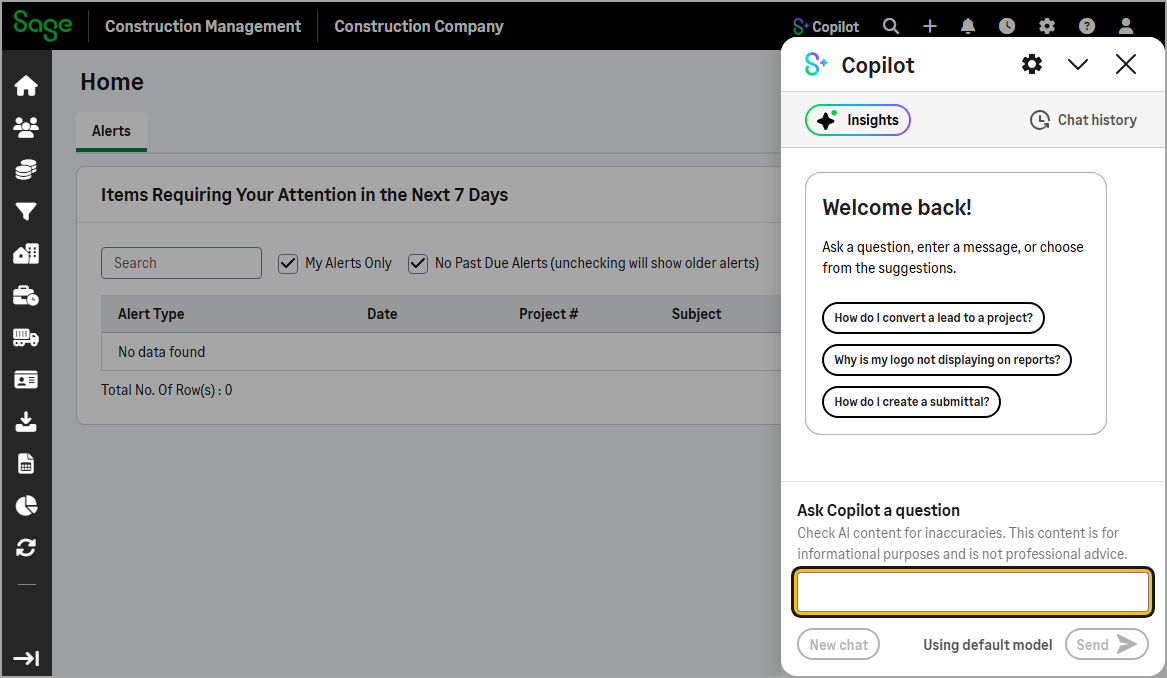
-
Enter a query using natural language in the search box located at the bottom of the Copilot panel.
Copilot responds with an answer and provides links to additional information.
-
Use natural language instead of keywords when writing your query.
-
Start your query with a question word such as how, what, or where. For example, “How do I create a bill?”.
-
Be as specific as possible to get more relevant results.
-
If the results are not helpful, try rephrasing your query or adding more context.
View and manage your search history
-
On the Copilot panel, select Chat History to view a list of your previous chat sessions.
-
Do the following as needed:
-
To view a chat session, select it from the list.
-
To rename a chat session, select the three-dot menu icon (
 ) and do the following:
-
Select Rename.
-
Edit the Chat name.
-
Select Save.
-
-
To add a chat session to your favorites, select the three-dot menu (
), then select Add to favorites. -
To delete a chat session, select the three-dot menu icon (
) , then select Delete.
-
Give feedback
You can help improve Copilot’s search accuracy and relevance by sharing your feedback.
Select the thumbs up ( ) or thumbs down icon (
 ) below an answer to let us know what you think.