Automatically synchronize payments and job cost-to-date details with Sage 100 Contractor
Related information
 Related topics
You can now configure AccountingLink to synchronize automatically client and vendor payments, job cost-to-date details, or both between Sage Construction Management and Sage 100 Contractor.
Details
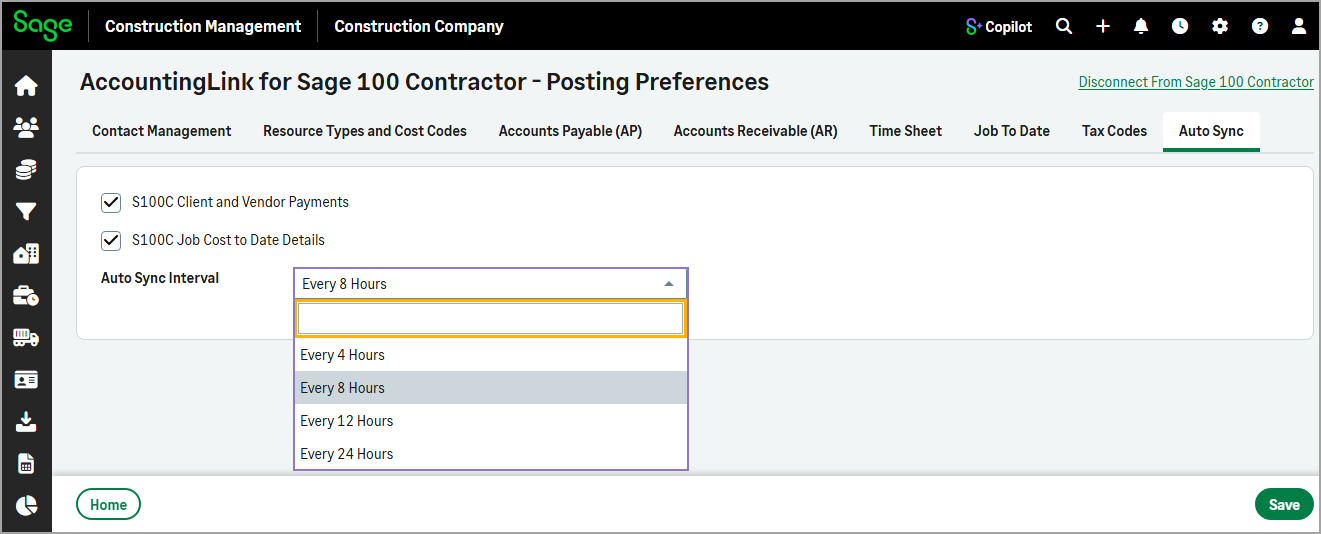
A new Auto Sync tab enables you to control what data is automatically synchronized and how often the sync runs. You can select to sync:
-
Client and vendor payments
-
Job cost-to-date details
You can also set the synchronization frequency. Available options include:
-
Every 4 hours
-
Every 8 hours
-
Every 12 hours
-
Every 24 hours
How it works
-
Log in to Sage Construction Management as an Administrator.
-
Go to Accounting Link and select Posting Preferences.
-
Select the Auto Sync tab.
-
Configure the data that will be automatically synchronized as follows:
-
To synchronize client and vendor payments automatically, select the S100C Client and Vendor Payments checkbox.
-
To synchronize job cots-to-date details automatically, select the S100C Job Cost to Date Details checkbox.
-
-
Specify how often to synchronize the data by selecting the appropriate option from the Auto Sync Interval dropdown.
-
Select Save.