Automatically synchronize payments and job cost-to-date details with Sage 300 Construction and Real Estate
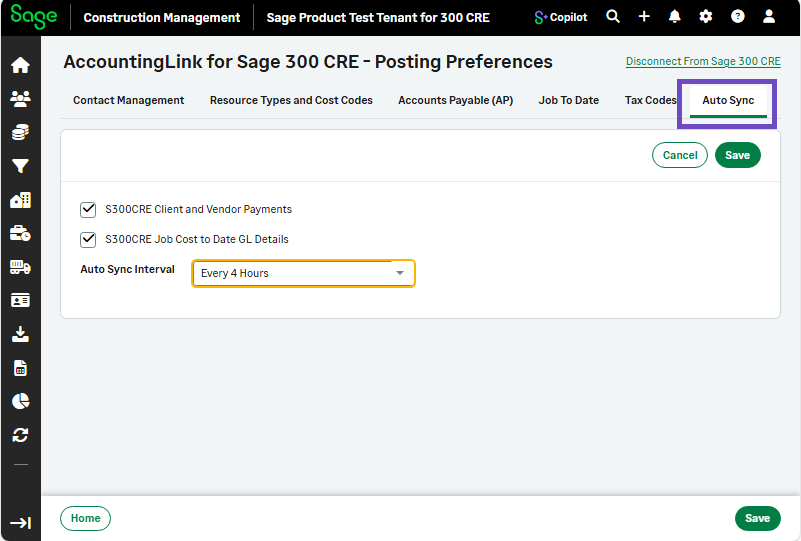
A new Auto Sync tab is available in the Posting Preferences for the AccountingLink with Sage 300 Construction and Real Estate.
Details
You can now use the Autosync tab options to enable automatic synchronization for the following data types:
-
Sage 300 Construction and Real Estate client and vendor payments
-
Sage 300 Construction and Real EstateJob Cost to Date (JTD) GL details
You can also control how often the synchronization runs by selecting a predefined interval:
-
Every 4 Hours
-
Every 8 Hours
-
Every 12 Hours
-
Every 24 Hours
How it works
- Log in to Sage Construction Management as an Administrator.
-
Go to Accounting Link and select Posting Preferences.
-
Select the Auto Sync tab.
-
Configure the data that will be automatically synchronized as follows:
-
To synchronize client and vendor payments automatically, select the S300CRE Client and Vendor Payments checkbox.
-
To synchronize job cost-to-date GL details automatically, select the S300CRE Job Cost to Date GL Details checkbox.
-
-
Select the appropriate option from the Auto Sync Interval dropdownto specify how often to synchronize the data.
-
Every 4 Hours
-
Every 8 Hours
-
Every 12 Hours
-
Every 24 Hours
-