Billable status when posting bills, sub invoices, timecards, and misc expenses
Related information
 Related topics
Billable status can now be set when posting transactions to Sage Intacct.
Details
You can now set the billable status when posting bills, sub invoices, timecards, and misc expenses through the Accounting Link for Sage Intacct.
When posting transactions to Sage Intacct, the billable status, Billable, Unbillable, or On Hold, can now be applied consistently across supported transaction types.
This enhancement applies when posting the following:
-
Bills
-
Sub Invoices
-
Labor Timecards
-
Equipment Timecards
-
Misc Expenses
When posting supported transactions through the Accounting Link for Sage Intacct, you can select the appropriate Billable Status during posting. The selected status is applied and carried through to Intacct based on your posting preferences.
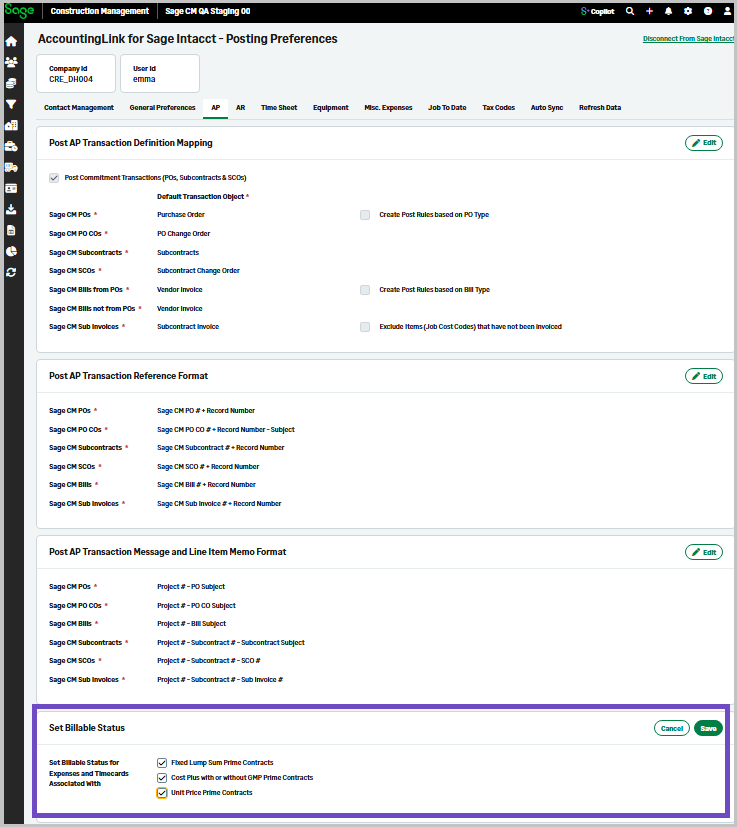
New properties for billable status are available in the Posting Preferences > AP tab to support this functionality.
How it works
-
Go to the AccountingLink for Sage Intacct.
-
Select Posting Preferences > AP.
-
Select any of the following in the Set Billable Status section:
-
Fixed Lump Sum Prime Contracts
-
Cost Plus with or without GMP Prime Contracts
-
Unit Price Prime Contracts
-