Previous and total values when posting prime and sub invoices
Related information
 Related topics
You can now review prime invoices and sub invoices faster by revising contract values alongside current, prior, and total invoice amounts, validate invoice totals, and track financial progress without leaving the Post Details forms.
Details
The prime and sub invoice post details pages now provide better visibility into revised contract values and invoice totals. These updates surface key financial information directly in the post details, reducing the need to cross-reference other views.
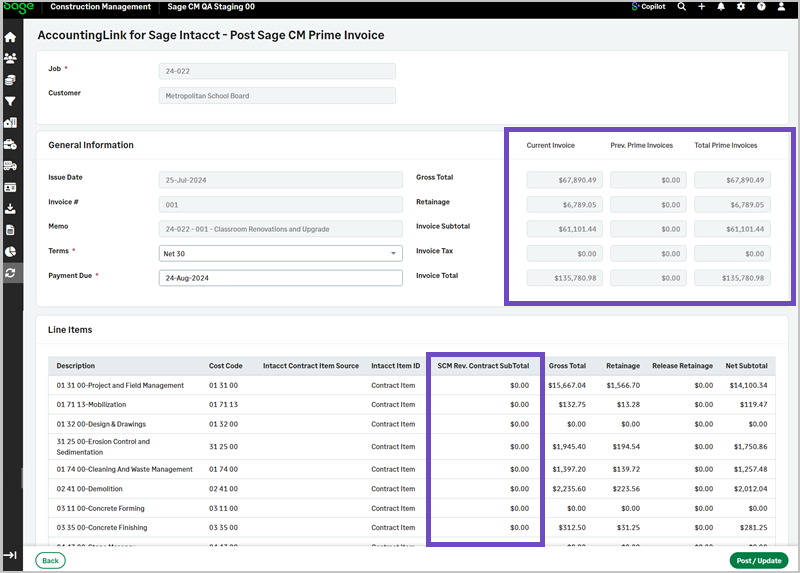
In the prime invoice post details page, the new fields include:
-
SCM Rev. Contract Subtotal
-
Current Invoice
-
Previous Prime Invoices
-
Total Prime Invoices
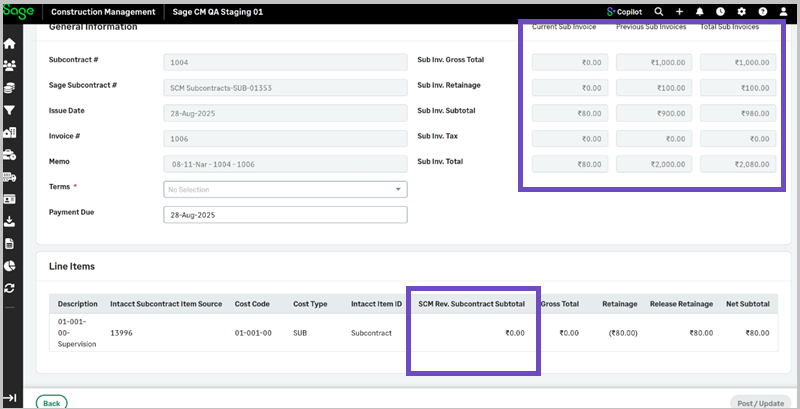
In the sub invoice post details page, the new fields include:
-
SCM Rev. Subcontract Subtotal
-
Current Sub Invoice
-
Previous Sub Invoices
-
Total Sub Invoices
How it works
To view previous and total prime invoices:
-
Go to the AccountingLink for Sage Intacct.
-
Select Batch Post Wizard.
-
Select Prime Invoices from the Jump To dropdown.
The new fields appear with the values for the Current Invoice, the Prev. Prime Invoices, and the Total Prime Invoices in the General Information section, and the SCM Rev. Contract SubTotal column displays in the Line Items section.
To view previous and total sub invoices:
-
Go to the AccountingLink for Sage Intacct.
-
Select Batch Post Wizard.
-
Select Sub Invoices from the Jump To dropdown.
The new fields appear with the values for the Current Invoice, the Prev. Sub Invoices, and the Total Sub Invoices in the General Information section, and the SCM Rev. Subcontract SubTotal column displays in the Line Items section.