Post customer and vendor contacts
Related information
 Related topics
You can now import, export, link, and automatically sync vendor and customer contacts between Sage Construction Management and Sage Intacct, keeping contact records aligned without manual follow‑up.
Details
The AccountingLink for Sage Intacct has been enhanced to support full vendor and customer contact management. This update introduces the ability to view linked contacts, manually or automatically link contacts, import and export contacts, and keep contacts in sync between Sage Construction Management and Sage Intacct.
In addition, when new customers or vendors are posted to Sage Intacct, their related contacts are now posted automatically after the parent record is successfully created, ensuring contact data stays consistent across systems.
Contacts are now also exported when a customer or vendor is exported through the following pages from Accounting Link > Contact Management:
-
View Linked Customer Contacts
-
View Linked Vendor Contacts
-
Manually Link Customer Contact
-
Manually Link Vendor Contact
-
Autolink Customer Contacts
-
Autolink Vendor Contacts
-
Export Sage CM Vendor Contacts
-
Export Sage CM Customer Contacts
-
Import Customer Contacts
-
Import Vendor Contacts
-
Sync Linked Customer Contacts
-
Sync Linked Vendor Contacts
How it works
-
Select Accounting Link > Posting Preferences.
-
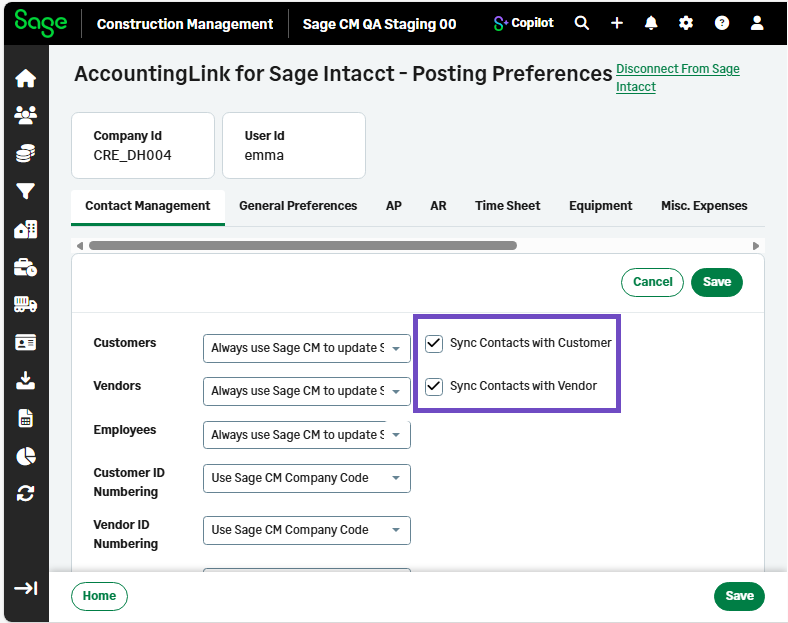
On the Contact Management tab, select the following checkboxes:
-
Sync Contacts with Customer
-
Sync Contacts with Vendor
-
-
Select Save.