Accounting status details for posted transactions
Related information
 Related topics
The Accounting Status section for posted transactions now provides more detailed posting information, making it easier to track synchronization with QuickBooks Desktop. You can view key details such as the ERP Account/File, Post Date, Post Status, and other posting-related information directly from the transaction.
Details
The Accounting Status section is now updated when the following transaction types are posted to QuickBooks Desktop:
-
Prime contracts
-
Prime invoices
-
Bills
-
Sub invoices
-
Labor timecards
-
Miscellaneous expenses
This enhancement provides greater visibility into transaction posting activity and helps you quickly verify the status of transactions exported to QuickBooks Desktop.
How it works
-
Open a project and select one of the following transactions:
- Prime Contracts
-
Prime Invoices
-
Bills
-
Sub Invoices
-
Lbr. Timecards
-
Misc. Expenses
-
Optionally, select Column and select the Accounting Record, Export Timestamp, and Post Status options to display accounting status details in the list.
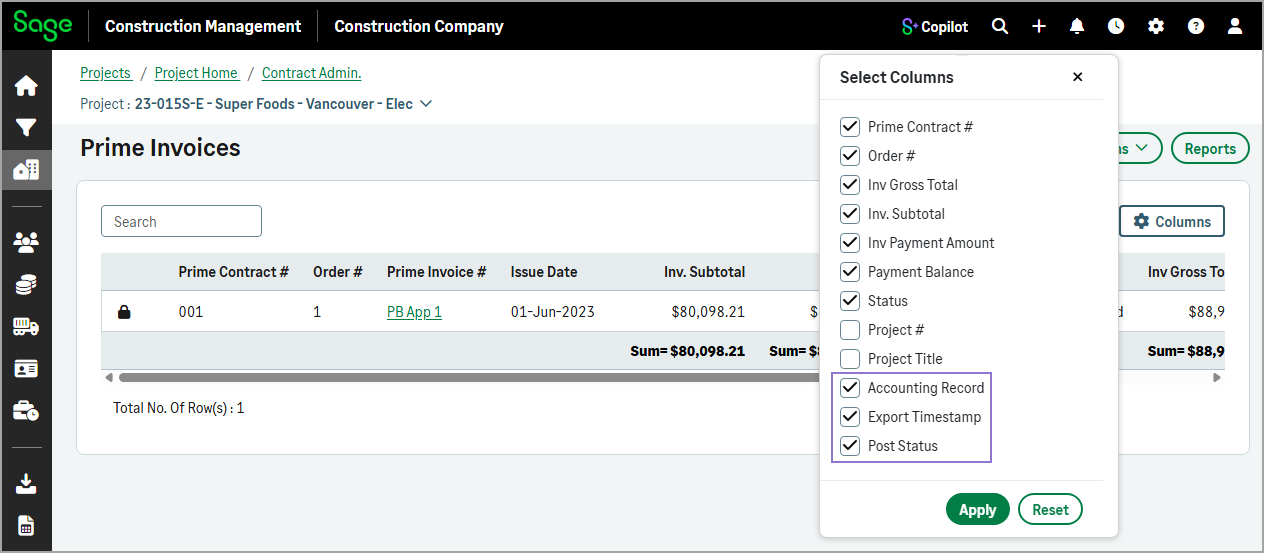
-
Select a transaction from the list.
-
In the Accounting Status section, review the posting status of the transaction.