New AP, AR, and Time & Expense views for transactions that cannot be posted
Related information
 Related topics
You can now identify records that cannot be posted because related items have already been marked as exported in the Accounts Receivable (AR), Accounts Payable (AP), and Time & Expenses tabs.
Details
AccountingLink for Sage Intacct now includes Accounts Payable (AP), Accounts Receivable (AR), and Time & Expenses transactions blocked from posting due to export status dependencies.
-
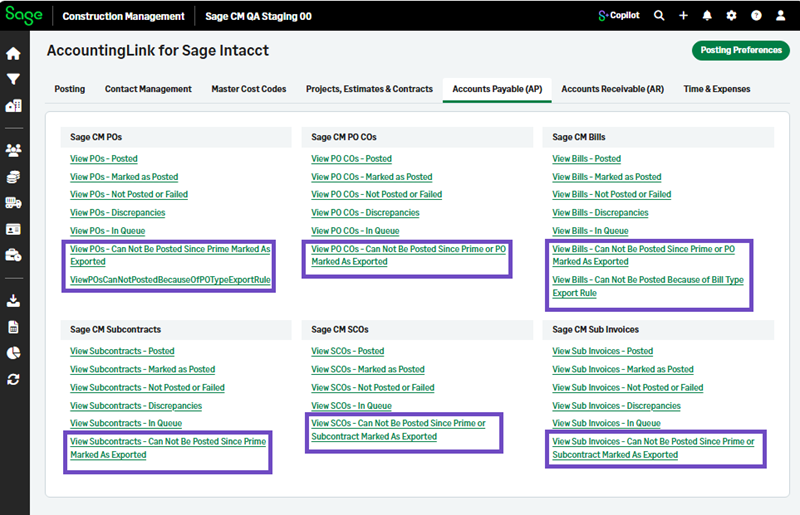
New AP transactions include:
-
View POs - Can Not Be Posted Since Prime Marked As Exported
-
View POs - Can Not Be Posted Because of PO Type Export Rule
-
View PO COs - Can Not Be Posted Since Prime or PO Marked As Exported
-
View Bills - Can Not Be Posted Since Prime or PO Marked As Exported
-
View Bills - Can Not Be Posted Because of Bill Type Export Rule
-
View Subcontracts - Can Not Be Posted Since Prime Marked As Exported
-
View SCOs - Can Not Be Posted Since Prime or Subcontract Marked As Exported
-
View Sub Invoices - Can Not Be Posted Since Prime or Subcontract Marked As Exported
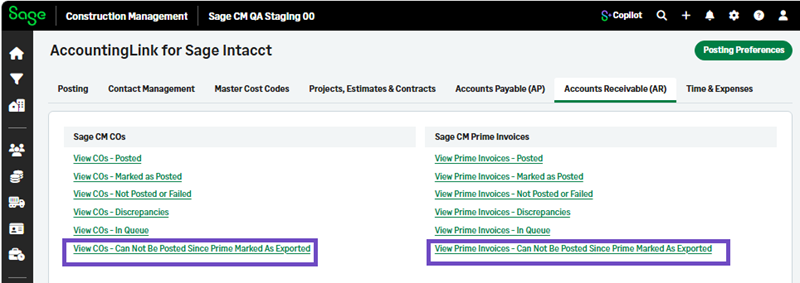
New AR transactions include:
-
View COs - Can Not Be Posted Since Prime Marked As Exported
-
View Prime Invoices - Can Not Be Posted Since Prime Marked As Exported
New Time and Expenses transactions include:
-
View Timecards - Can Not Be Posted Since Prime Marked As Exported
-
View Eqp Timecards
-
View Misc Expenses
How it works
-
Go to AccountingLink and select AP, AR, or Time & Expenses.
-
Select the views that apply: