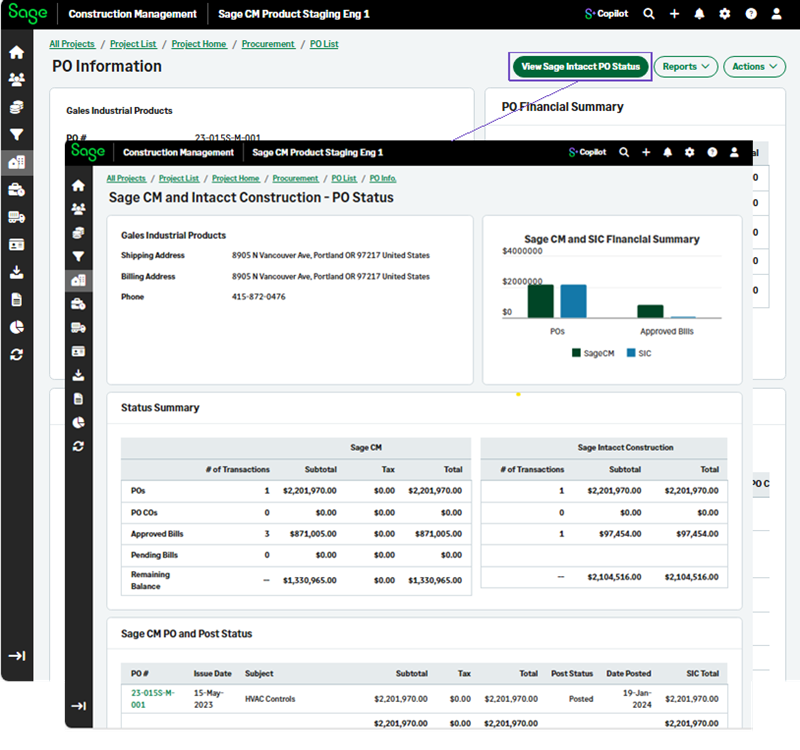
View the Sage Intacct PO, subcontract, or SCO status in Sage Construction Management
Related information
 Related topics
You can view the Sage Intacct status of a purchase order, a subcontract, or a subcontract change order (SCO) in Sage Construction Management.
Details
The Sage Intacct posting status of Purchase Orders (POs), subcontracts, subcontract change orders (SCOs) displays directly within Sage Construction Management.
This enhancement adds real‑time visibility of the Sage Intacct status for POs, subcontracts, and SCOs that have been posted through AccountingLink using Purchasing Transaction Definitions (TD). After configuration of Sage Construction Management, AccountingLink, and any optional third‑party AP automation integrations, users can now see whether a PO, subcontract, or SCO has successfully posted to Sage Intacct without logging off Sage Construction Management.
How it works
To view the Sage Intacct status of a PO, subcontract, or SCO:
-
Select Projects and open the required project.
-
Select POs, Subcontracts, or SCOs.
-
Open the required PO or and select View Sage Intacct PO Status.
To view the Sage Intacct status of a subcontract:
-
Select Projects and open the required project.
-
Select POs, Subcontracts, or SCOs.
-
Open the required item and select View Sage Intacct Status.