Support for PO COs in the procurement transaction workflow
Related information
 Related topics
You can now create approval rules for purchase order change orders (PO COs) in the procurement transaction workflow.
Details
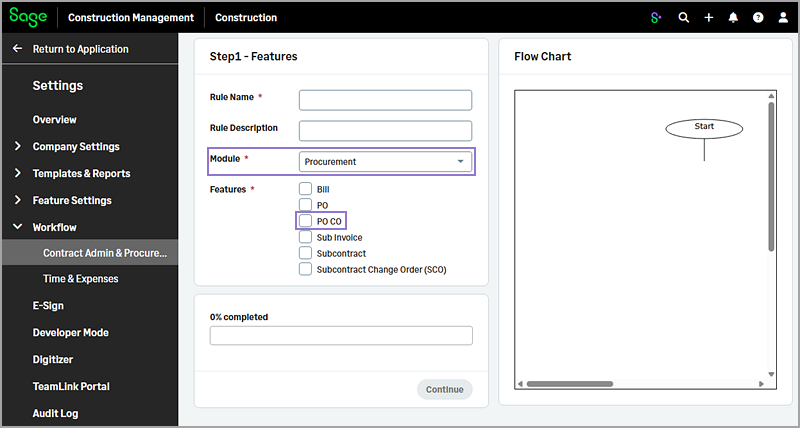
This enhancement enables you to create and apply approval rules specifically for PO COs, ensuring that any changes to purchase orders follow the appropriate review and approval process. The PO CO option has now been added to the workflow rules in Settings ( ) > Workflow > Contract Admin & Procurement, allowing you to configure these approvals directly within the workflow setup.
When the workflow is enabled and you create a PO CO, either manually or from a PO, you cannot update the Status if a rule applies to that PO CO.
How it works
Create a rule for a PO CO
-
Go to Settings (
) > Workflow > Contract Admin & Procurement. -
Select Add in the Workflow Rules section.
-
Select Procurement from the Module dropdown.
-
Select the PO CO checkbox in the Features field.
-
Fill in the remaining information in each step as needed and save the rule.
The Workflow section appears on the PO CO Information page. If the rule applies to the selected PO CO, you can select Initiate to begin the approval process.
View existing rules for PO COs
-
Go to Settings (
) > Workflow > Contract Admin & Procurement. -
In the Workflow Rules section, select Procurement from the Module dropdown and PO CO from the Feature dropdown.