Transaction validation before posting to Sage 100 Contractor
Related information
 Related topics
Transactions in Sage Construction Management are now validated before posting to Sage 100 Contractor, allowing you to identify and resolve validation issues before reprocessing.
Details
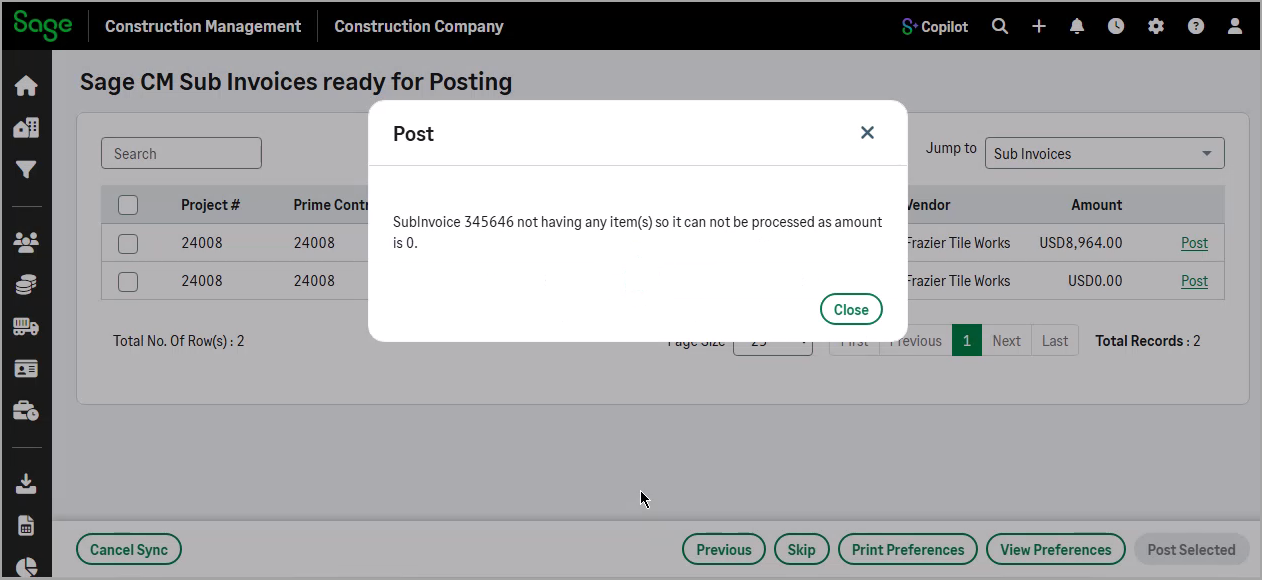
If a transaction has validation issues, a detailed error message is displayed and the transaction is not posted.
This enhancement applies to the following transaction types:
-
Prime contracts
-
Change orders (CO)
-
Prime invoices
-
Purchase orders (PO)
-
Bills
-
Subcontracts
-
Subcontract change orders (SCO)
-
Subcontract invoices
How it works
-
Go to Accounting Link and select Posting > Batch Post Wizard.
-
From the Jump to dropdown, select the desired transaction type.
-
Select Post next to a single record or select multiple records from the list and select Post Selected.
-
If any validation errors occur, they appear in a dialog for you to review and resolve before posting.