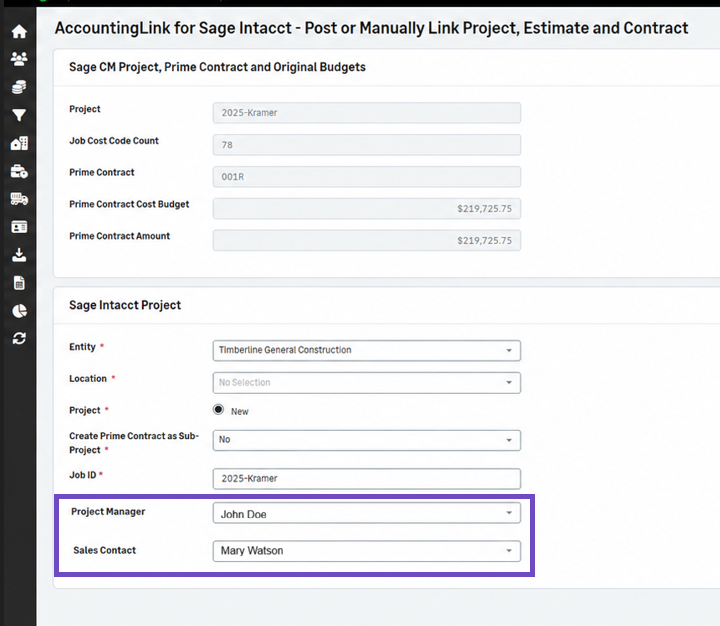
Automatically populate Project Manager and Sales Contact from Sage Intacct
The Project Manager and Sales Contact field values entered in Sage Intacct are now automatically populated when creating jobs through the AccountingLink for Sage Intacct.
Previously, the PM Contact and Sales Contact had to be entered manually in Sage Construction Management.
Details
The Project Manager and Sales Contact fields are now automatically populated in Sage Construction Management when a job is created using the AccountingLink for Sage Intacct. The system maps these fields directly from the corresponding job contact fields that have been added in the Job Information page in Sage Intacct.
How it works
-
In Sage Intacct, the Project Manager and Sales Contact fields are added in the People section of the Job Information page.
-
The Contact ID exists in the Contact List in Sage Intacct.
-
In Sage Construction Management, the PM Contact and Sales Contact values are selected in the Internal Stakeholders section of the Project Home page.
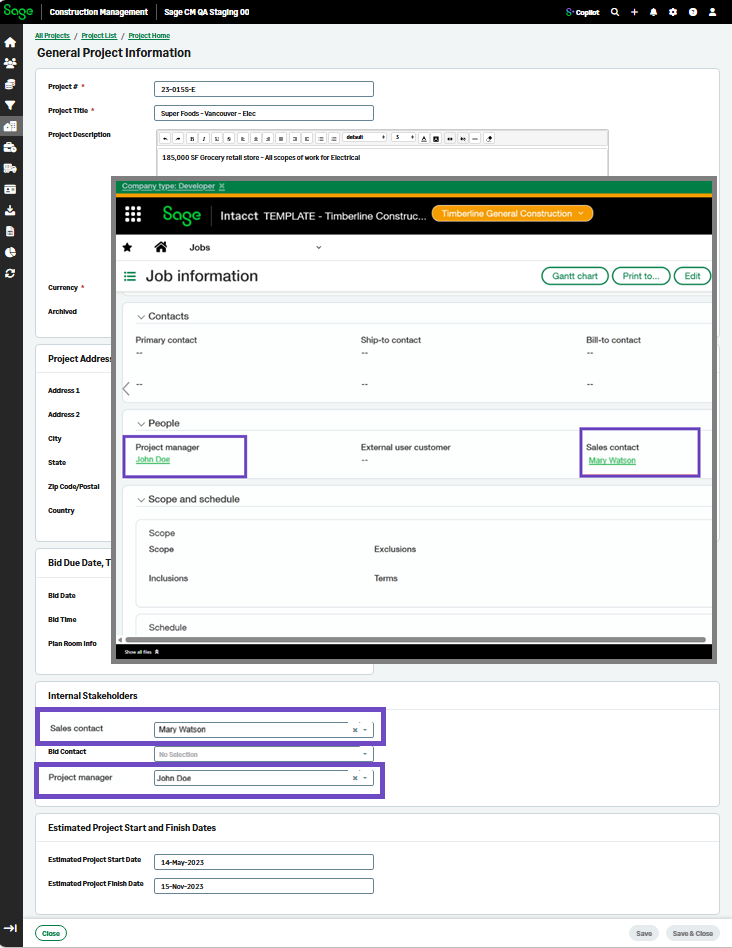
To view the fields in Sage Construction Management:
- Go to Accounting Link and select the Projects, Estimates & Contracts tab.
-
Select View Projects | Primes - Not Posted or Failed or View Projects | Primes - Partially Posted.
The Project Manager and Sales Contact fields display.