Tax code support for AP, AR, or both
You can now specify whether a tax code applies to Accounts Payable (AP), Accounts Receivable (AR), or both transaction types.
Details
You can now manage and select the appropriate tax codes for procurement and contract administration processes. New options are now included in the tax code creation page, enabling you to select whether a tax code applies only to AP or only to AR or to both transactions. You can also filter AP Only, AR Only, or both AP and AR tax codes in the Tax Codes page.
How it works
- Go to Settings > Company Settings > Taxation.
- Select Add on the top right of the Tax Codes page.
- Enter the new tax code details, such as Code, Description, Tax Rate, and select AP Only, AR Only, or Both AP and AR.
- Select Save.
- Use the Tax Code filter on the Tax Codes page to display all tax codes or only those that apply to AP or AR transactions.
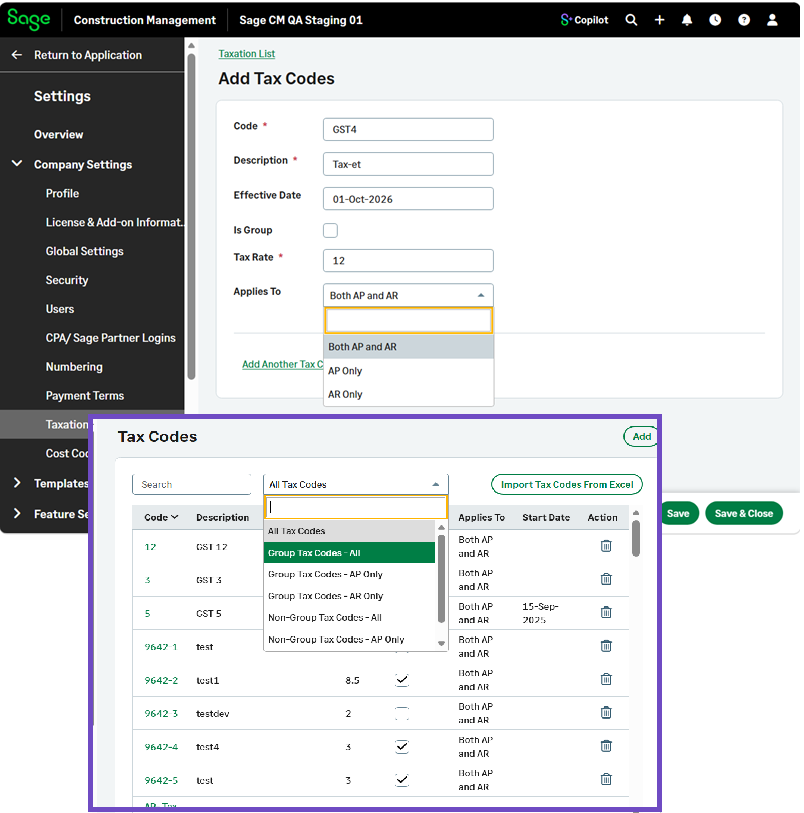
If you select AP Only or AR Only, only tax codes configured for the applicable transaction type will be available for selection in related workflows.