New mail merge fields for FLS prime invoice detail reports
Related information
 Related topics
Fixed Lump Sum (FLS) prime contract invoice detail report templates now support additional mail merge fields for previously invoiced schedule of values and change orders, enabling more detailed and flexible reporting.
Details
The following additional mail merge fields are now supported for Fixed Lump Sum (FLS) prime contract invoice detail report templates:
-
FLS prime contract invoice summed by job cost code and grouped by internal division code:
-
DivPreviousScheduleValueTotal
-
DivPreviousScheduleValueRetainTotal
-
DivPreviousScheduleValueTotalLessRetain
-
DivPreviousChangeOrderTotal
-
DivPreviousChangeOrderRetainTotal
-
DivPreviousChangeOrderTotalLessRetain
-
JCCPreviousScheduleValueTotal
-
JCCPreviousScheduleValueRetainTotal
-
JCCPreviousScheduleValueTotalLessRetain
-
JCCPreviousChangeOrderTotal
-
JCCPreviousChangeOrderRetainTotal
-
JCCPreviousChangeOrderTotalLessRetain
-
-
FLS prime contract invoice summed by job cost code and grouped by owner code:
-
OwnerPreviousScheduleValueTotal
-
OwnerPreviousScheduleValueRetainTotal
-
OwnerPreviousScheduleValueTotalLessRetain
-
OwnerPreviousChangeOrderTotal
-
OwnerPreviousChangeOrderRetainTotal
-
OwnerPreviousChangeOrderTotalLessRetain
-
JCCPreviousScheduleValueTotal
-
JCCPreviousScheduleValueRetainTotal
-
JCCPreviousScheduleValueTotalLessRetain
-
JCCPreviousChangeOrderTotal
-
JCCPreviousChangeOrderRetainTotal
-
JCCPreviousChangeOrderTotalLessRetain
-
-
FLS prime contract invoice with item details summarized by internal division code:
-
DivPreviousScheduleValueTotal
-
DivPreviousScheduleValueRetainTotal
-
DivPreviousScheduleValueTotalLessRetain
-
DivPreviousChangeOrderTotal
-
DivPreviousChangeOrderRetainTotal
-
DivPreviousChangeOrderTotalLessRetain
-
-
FLS prime contract invoice with item details summarized by job cost code:
-
JCCPreviousScheduleValueTotal
-
JCCPreviousScheduleValueRetainTotal
-
JCCPreviousScheduleValueTotalLessRetain
-
JCCPreviousChangeOrderTotal
-
JCCPreviousChangeOrderRetainTotal
-
JCCPreviousChangeOrderTotalLessRetain
-
-
FLS prime contract invoice with item details summarized by owner code:
-
OwnerPreviousScheduleValueTotal
-
OwnerPreviousScheduleValueRetainTotal
-
OwnerPreviousScheduleValueTotalLessRetain
-
OwnerPreviousChangeOrderTotal
-
OwnerPreviousChangeOrderRetainTotal
-
OwnerPreviousChangeOrderTotalLessRetain
-
How it works
-
Download the default Word templates ZIP file and open the appropriate FLS prime invoice detail report template file in Microsoft Word.
-
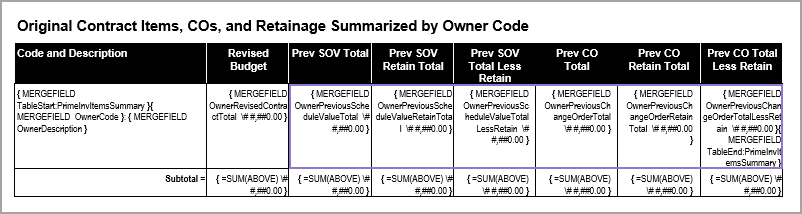
Insert the new mail merge fields into the mail merge table as needed.
For example:
-
Save the template in DOT or DOC format.
-
In Sage Construction Management, go to Settings (
 ) > Templates & Reports > Detail Report Templates and upload the file as usual.