Use Sage Construction Management transaction numbers as Sage Intacct document numbers
Related information
 Related topics
You can now use Sage Construction Management transaction numbers as the corresponding document numbers created in Sage Intacct to maintain consistent numbering between the two systems.
Details
AccountingLink for Sage Intacct now supports using Sage Construction Management transaction numbers as document numbers when posting transactions to Sage Intacct. This enhancement applies to a range of transaction types, including:
-
Prime invoices
-
Purchase orders
-
Purchase order change orders
-
Bills
-
Subcontracts
-
Subcontract change orders
-
Subcontract invoices
How it works
-
Go to Accounting Link and select Posting Preferences.
-
Select APor AR and then select Edit.
-
Select all that applies for each transaction type and select Submit.
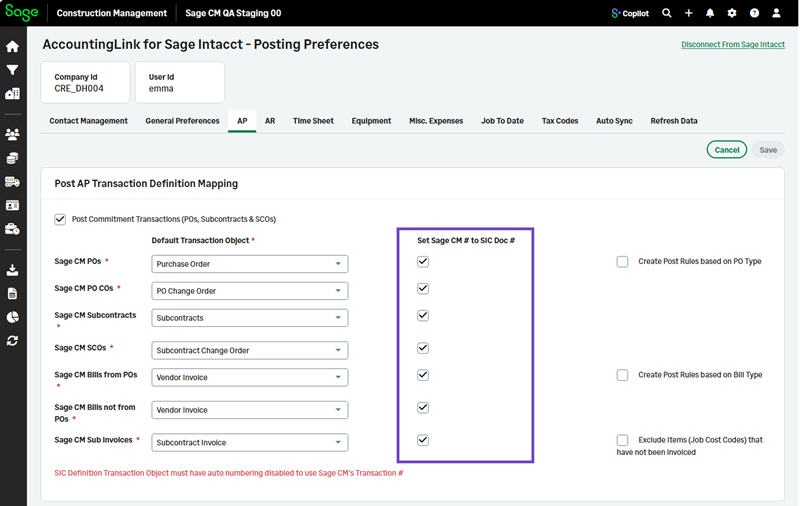
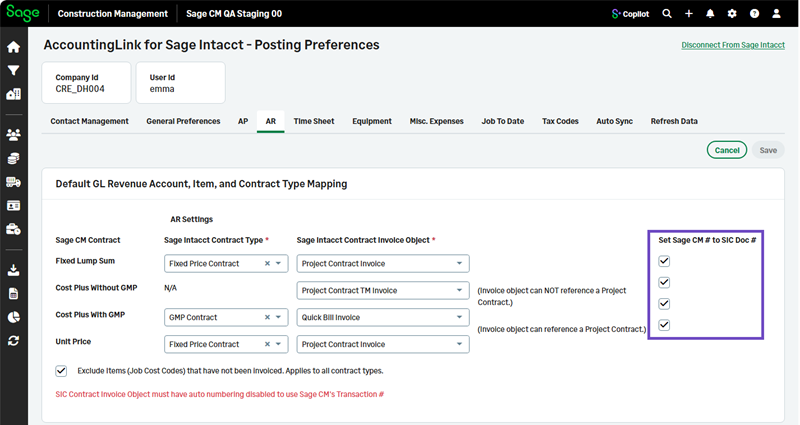
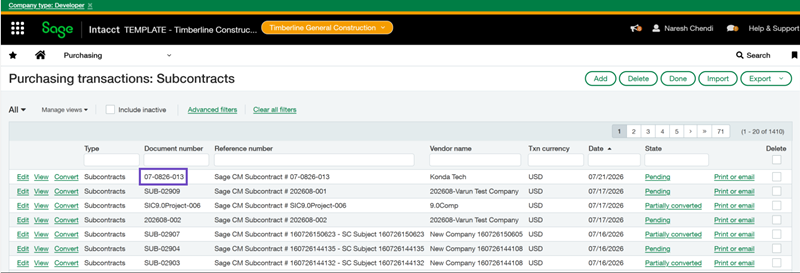
The Sage Construction Management transaction doc number appears in Sage Intacct. For example:
 The Contract Invoice Object must have auto numbering disabled in Sage Intacct to use the Sage Construction Management Transaction #.