New labor timecards export formats for Sage 50
Related information
 Related topics
Labor timecards can now be exported in Sage 50 Canada and Sage 50 US formats, making it easier to transfer payroll data into the appropriate Sage 50 accounting system.
Details
When the Accounting System field in Settings ( ) > Company Settings > Profile is configured for Sage Simply Accounting, two additional export formats become available for labor timecard exports:
-
Sage CM Labor Timecards for Sage 50 CA Import
-
Sage CM Labor Timecards for Sage 50 US Import
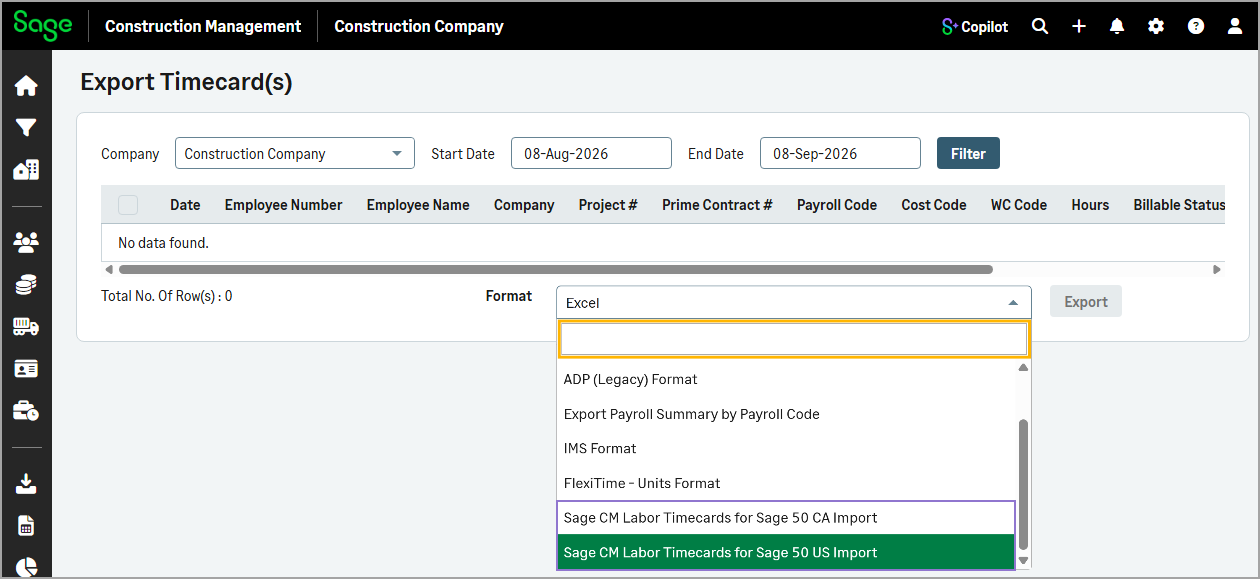
These new export options help streamline payroll and accounting workflows by providing files tailored to the Sage 50 product being used.
How it works
- Open a project and select Lbr. Timecards in the Time & Expenses section.
- Select Actions > Export Labor Timecards To Excel.
- Select one of the following formats from the Format dropdown:
Sage CM Labor Timecards for Sage 50 CA Import
Sage CM Labor Timecards for Sage 50 US Import
-
Select Export.