New purchase order change order (PO CO) detail report
Related information
 Related topics
You can now download or share detail reports for purchase order change orders (PO COs). A new customizable Word detail report template is also available in Sage Construction Management, allowing you to tailor the report to your needs.
Details
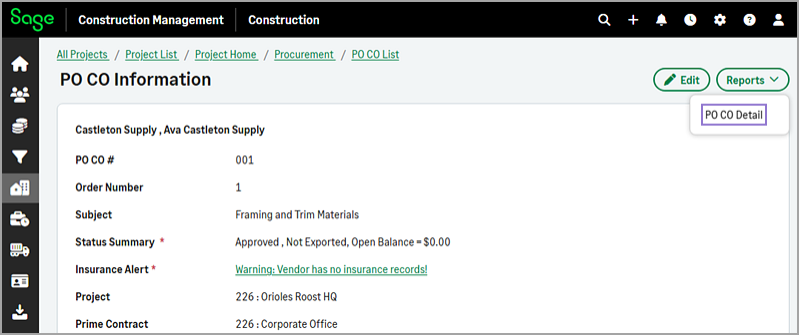
To download or share a report for a PO CO, use the new Reports > PO CO Details option available on the PO CO Information page.
To tailor the report to your needs, you can download and customize the POCO.dot template file that's included in the ZIP file. The template supports the following PO CO-specific bookmarks:
-
POCO general information:
-
POCOOrderNumber
-
POCONumber
-
POCODate
-
POCOType
-
POCOSubject
-
POCORefCONumber
-
POCORefWONumber
-
POCOTerms
-
POCOStatus
-
POCOStatusDate
-
POCOSubtotal
-
POCOTaxTotal
-
POCOTotal
-
POCOInternalComments
-
POCOComments
-
-
POCO ship to information:
-
POCOShipVia
-
POCOShipAddress1
-
POCOShipAddress2
-
POCOShipCity
-
POCOShipState
-
POCOShipZipCode
-
POCOShipCountry
-
-
Current Approved PO CO information:
-
CurrentPOCOSubtotal
-
CurrentPOCOTaxTotal
-
CurrentPOCOTotal
-
CurrentRevisedPOSubtotal (=POSubtotal + PreviousPOCOSubtotal + CurrentPOCOSubtotal)
-
CurrentRevisedPOTaxTotal (=POTaxTotal + PreviousPOCOTaxTotal + CurrentPOCOTaxTotal)
-
CurrentRevisedPOTotal (=POTotal + PreviousPOCOTotal + CurrentPOCOTotal)
-
-
Previous approved PO CO information:
-
PreviousPOCOCount
-
PreviousPOCOSubtotal
-
PreviousPOCOTaxTotal
-
PreviousPOCOTotal
-
PreviousPOSubtotalRevised (=POSubtotal + PreviousPOCOSubtotal)
-
PreviousPOTaxTotalRevised (=POTaxTotal + PreviousPOCOTaxTotal)
-
PreviousPOTotalRevised (=POTotal + PreviousPOCOTotal)
-
The template supports the following PO CO-specific mail merge fields:
-
Merge table start and end tags: POCODetails
-
Fields:
-
ItemNumber
-
ItemDescription
-
ItemUnit
-
ItemUnitPrice
-
POCOItemQuantity
-
POCOItemSubtotal
-
POCOItemTaxTotal
-
POCOItemTotal
-
ItemCostCode
-
ItemCostResource
-
ItemTaxCode
-
See the full list of the supported bookmarks and mail merge fields.
How it works
Download or share a PO CO detail report
- Go to Projects and select the appropriate project from the list.
- On the Project page, select PO COs in the Procurement category of the Project Menu section.
- Select the appropriate PO CO number from the list.
-
Select Reports > PO CO Details.
-
In the dialog, select the Template and one of the following Export Options:
-
To download and print a report:
- .DOC (Word 2003)
- .DOCX (Word 2007)
- PDF (Adobe Acrobat)
-
To share a report through TeamLink:
- Save DOC to Linked Files
- Save PDF to Linked Files
-
Upload a customized PO CO detail report template
- Download the POCO.dot template and customize it as needed.
-
Log in to Sage Construction Management as an Administrator.
-
Go to Settings (
 ) > Templates & Reports > Detail Report Templates.
 -
Select Upload.
-
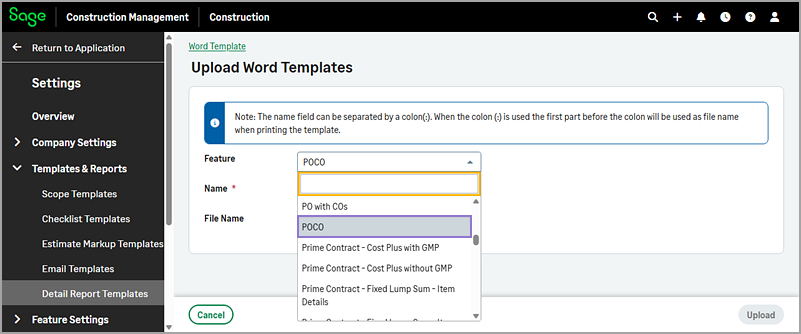
On the Upload Word Templates page, select POCO from the Feature dropdown and upload the template file as usual.