Reset functions for subcontract invoices
Related information
 Related topics
You can now reset a subcontract invoice to incorporate subcontract changes or reset its tax codes.
Details
The Reset Functions section has been added to the Sub Invoice Information page with the following functions:
-
Use the Reset Tax Codes function to update all tax code references in a subcontract invoice using the default tax code from the job cost code table. This ensures tax codes are consistent across the invoice.
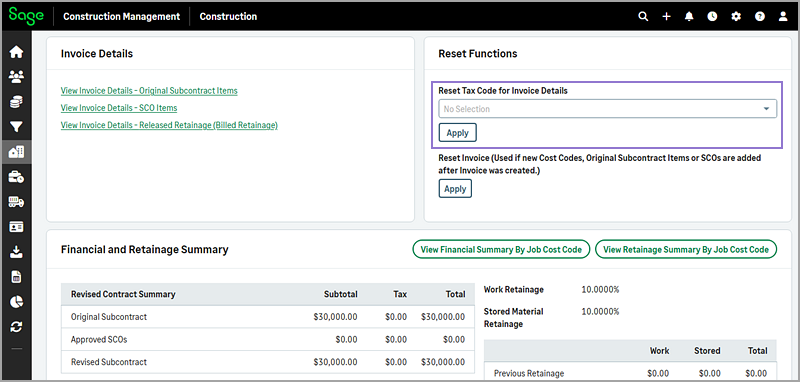
The following information is updated based on the subcontract type:
-
Fixed Lump Sum subcontracts:
-
Original subcontract items
-
Subcontract change order items
-
Billed retainage
-
-
Cost Plus subcontracts (with or without GMP):
-
Cost plus subcontract invoice items
-
Billed retainage
-
-
Unit Price subcontracts:
-
Original subcontract unit price items
-
Subcontract change order items
-
Billed retainage
-
-
-
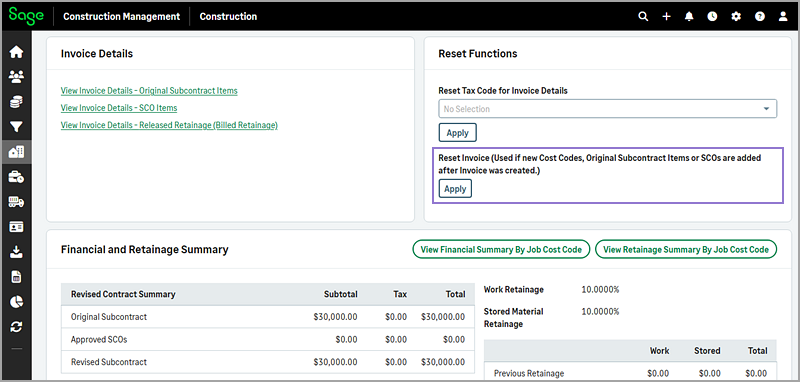
Use the Reset Invoice function to update cost codes when original subcontract items, cost codes, or change orders are modified after an invoice is created. This option is available for subcontract invoices on Fixed Lump Sum subcontracts.
How it works
- On the Project page, select Sub Invoices in the Procurement category of the Project Menu section.
- Select the subcontract invoice number from the list.
- Do the following in the Reset Functions section as needed:
- To reset an invoice for a Fixed Lump Sum subcontract, select Apply under the Reset Invoice function.
- To reset the tax codes, select the tax code from the Reset Tax Code for Invoice Details dropdown and select Apply.