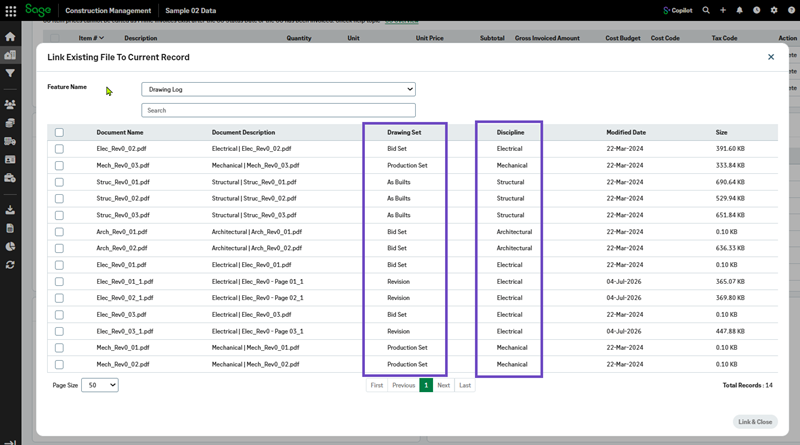
Drawing Set and Discipline columns in Link Existing File to Current Record
Related information
 Related topics
Drawing Set and Discipline columns have been added to the Link Existing File to Current Record grid when Drawing Log is selected as the source, providing additional drawing information to help users identify the correct file more quickly.
Details
The Link Existing File to Current Record feature has been enhanced for the Drawing Log source. Users can now view the Drawing Set and Discipline associated with each drawing directly within the selection grid. This additional information improves visibility and makes it easier to differentiate between similar drawing records when linking existing files.
How it works
-
Open the required project and select Linked Files.
-
Select Link Existing > Drawings & Specs.
-
Select Drawing Log from the Feature Name dropdown.
-
Link Existing File to Current Record.
-
Select the required documents and select Link & Close .
Review the available drawing records. You can use the new Drawing Set and Discipline columns to identify the appropriate drawing.