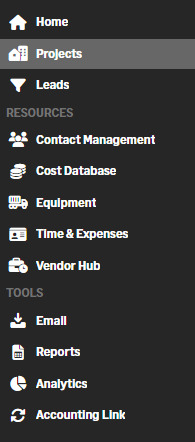
Redesigned left navigation menu
Related information
 Related topics
You can now navigate more easily with a reorganized and categorized left side bar menu.
Details
The left side bar menu has been redesigned to improve usability and make key features easier to find. Core features such as Projects and Leads are now positioned at the top of the menu. Modules are grouped into clearly defined categories, including Resources and Tools, to help differentiate areas of the application.
Visual indicators have also been added to maintain consistency when the menu is expanded or collapsed. Category labels are shown when expanded, and separators are displayed when collapsed, ensuring icons remain aligned.
How it works
- Use the left side bar menu to access modules.
- Locate core features such as Home, Projects, and Leads at the top of the menu.
- When the menu is expanded, review modules grouped under category labels such as Resources and Tools.
- When the menu is collapsed, use visual separators to distinguish module groupings.