Import Sage Intacct sub invoices into Sage Construction Management
You can now import subcontract invoices from Sage Intacct into Sage Construction Management, helping to keep subcontractor billing records synchronized between both applications.
Details
AccountingLink for Sage Intacct now supports importing subcontract invoices from Sage Intacct into Sage Construction Management to ensure that subcontract invoice information remains consistent across both systems.
The import process supports standard subcontract invoices and provides additional controls for managing imported records. Related updates have been made to Auto Sync settings, subcontract invoice pages, audit history, and security controls to support the new functionality.
More specifically, you can now:
- Import sub invoices from Sage Intacct into Sage Construction Management.
- Synchronize standard subcontract invoices.
- Configure subcontract invoice imports through the Auto Sync settings.
- View and manage imported subcontract invoices in Sage Construction Management.
- Track subcontract invoice import activity through enhanced audit history records.
- Control the availability of subcontract invoice actions based on configuration settings.
How it works
-
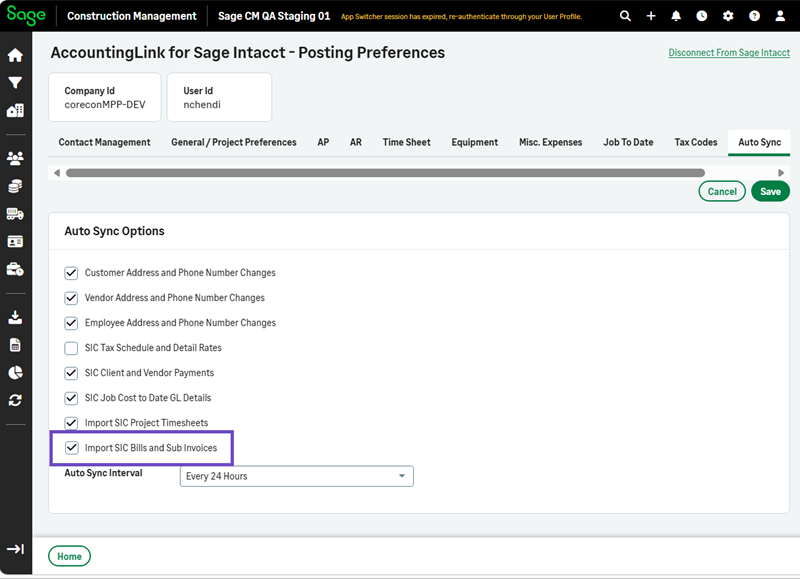
Select Accounting Link > Posting Preferences > Auto Sync > Edit.
-
Select the Import SIC Bills and Sub Invoices checkbox
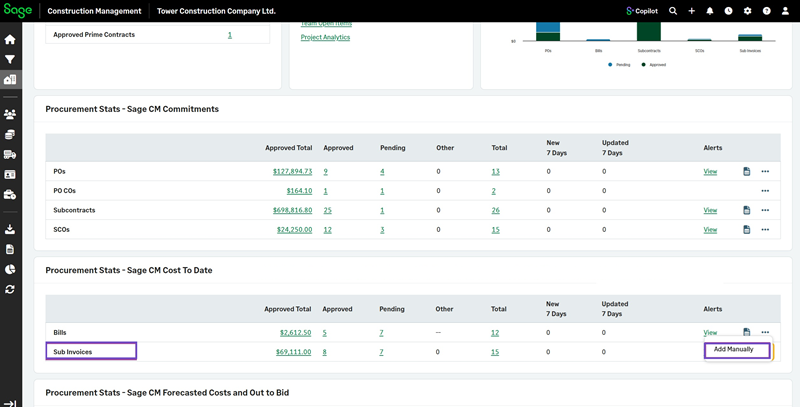
The Add Manually options are disabled for Sub Invoices in Procurement: