Work assembly overview
A work assembly is a group of labor, equipment, and work items that make up a single system or operation of work. All components in an assembly share common dimensional information, allowing you to manage related items as a single unit.
Work assemblies are a powerful tool for building estimates quickly and accurately, helping reduce the risk of missing items during the estimating process.
For example, when you add an assembly to an estimate, all of its components are added automatically. The quantity of each component is calculated based on a shared list of variables as shown in the example below.
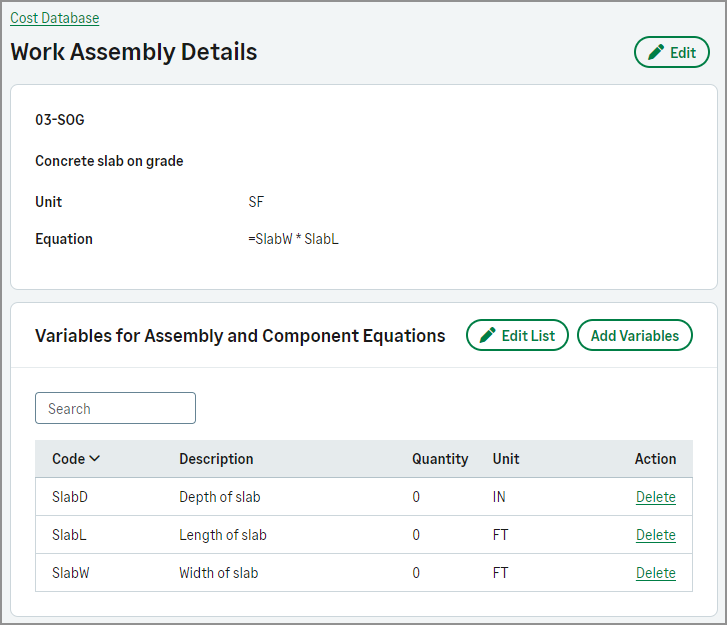
- Each work assembly and its components must include a formula that uses one or more shared variables. These variables allow Sage Construction Management to calculate all quantities at once.
-
If a work assembly uses the built-in WAQty variable, you must not add any variables in the Variables for Assembly and Component Equations section of the work assembly. Particularly, for kit-type assemblies, there cannot be any other variables in the work assembly.
-
If a work assembly uses only the WAQty variable, the Quantity in estimates is calculated based on the value entered when the item is added from the cost database.
- You can add or remove components from a work assembly even after it has been added to an estimate. For example, in a concrete assembly, the required concrete strength, such as 3000, 3500, or 4000 PSI, can vary between estimates. In this case, the original item, such as 3000 PSI, can be removed and replaced with another, such as 3500 PSI, to reflect the updated requirement.
- Variable codes must not contain spaces. For example, use LS instead of L S for Length of Slab.
- Do not use single-character variable codes, such as W or L.
- If you use a multiplier less than one (1) in a component or assembly formula, it must include a leading zero (0) before the decimal point. For example, use 0.33 instead of .33.
- Ensure all labor, equipment, and work items that will be referenced as components in an assembly have already been set up.
- Optionally, specify classification codes to group or filter work assembly items.